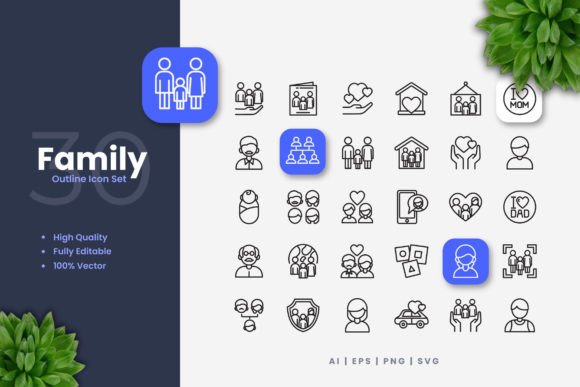
The Versatility of Family Icons in Modern Design Projects
In the landscape of digital and print design, icon sets serve as fundamental visual shorthand, communicating concepts quickly and effectively. Among these resources, Family Icons represent a specialized collection focused on depicting relationships, household activities, and domestic life. Their distinct value lies not just in their thematic focus, but in their execution: a simple and clean design philosophy that prioritizes clarity and adaptability. This approach makes them a contender for a wide array of applications, from website interfaces to printed flyers.
What Defines the Simple and Clean Icon Design Approach
A simple and clean icon aesthetic, as seen in Family Icons, emphasizes minimal detail, consistent stroke weights, and unambiguous forms. This style contrasts with more illustrative, detailed, or skeuomorphic icon sets that may include complex textures, shadows, or intricate details. The clean vector lines ensure that each symbol remains legible even at very small sizes, such as in mobile app navigation bars, or when enlarged for poster graphics. This universality of scale is a primary strength.
When evaluating icon sets, designers often weigh the tradeoff between stylistic uniqueness and functional utility. A highly stylized, artistic set might be perfect for a specific branding project but lack the flexibility for broader use. Family Icons, with their neutral and clean presentation, lean towards utility and adaptability. They can often integrate into existing designs without clashing visually, acting as supportive elements rather than dominant stylistic forces. This makes them a practical choice for projects where the icons need to communicate information without distracting from other visual content.
Core Features That Enable Customization
The technical specifications of Family Icons directly support their promise of versatility. Being provided as 100% vector files means each icon is mathematically defined by points, lines, and curves, not by fixed pixels. This is crucial for the listed feature of easy editing in vector software like Adobe Illustrator and CorelDRAW. A designer can resize a family member icon to any dimension without any loss of quality, change its color to match a brand palette, or adjust its stroke weight to appear thicker or more delicate.
These editable characteristics offer a significant advantage over static, raster-based icon packs (like those offering only PNG files). With vector source files, the icons become a starting point, not a final product. You can modify a "parent reading" icon to have a dashed outline, or combine elements from several icons to create a new, context-specific symbol. This level of customization is essential for professionals who need assets to fit precisely into a predetermined design system, rather than forcing the design system to accommodate the assets.
Comparing File Formats and Their Practical Applications
The included file formats—AI, EPS, SVG, and PNG—each serve different scenarios in the design workflow, and understanding their strengths helps in selecting the right resource.
- Source File (AI): This is the native Adobe Illustrator file, typically offering the most straightforward editing experience for users of that software, with layers and editable strokes preserved.
- EPS Version 10: A legacy vector format with wide compatibility across different software, including CorelDRAW and older versions of design programs. It's often used for print-ready artwork.
- SVG File: This is the modern web standard for vector graphics. SVG files are scalable, small in file size, and can be manipulated with CSS or JavaScript, making Family Icons directly usable in web development and interactive projects.
- PNG Transparency: These raster files provide a ready-to-use format with a transparent background. They are ideal for quick placement in presentations, social media graphics, or situations where vector software is not available, though they lack scalability.
A comprehensive pack like Family Icons that provides all these formats removes a common hurdle. Some icon sets only offer PNGs, which locks you into fixed resolutions. Others might offer only SVG, which is less convenient for a print-focused designer. Having the suite means you can use the same icon set for a website (SVG), a mobile app UI (resized vector), and a companion flyer (EPS), ensuring visual consistency across all media.
Evaluating Fit for Different Projects and Media
The description lists suitability for websites, mobile apps, books, social media, infographics, flyers, print, banners, posters, and more. This breadth is plausible because of the clean design and multiple file formats. However, the "best fit" depends on the specific project's stylistic requirements.
For a modern, minimalist website or app, the simple lines of Family Icons would align well. Their clarity aids usability. In an infographic about demographic trends, these icons could visually represent household types efficiently. For a printed children's book, however, a designer might seek more whimsical, illustrated icons to match the narrative tone. Similarly, for a vibrant, energetic social media campaign, one might need icons with more bold color blocks or dynamic shapes. Family Icons serve projects where neutrality, clarity, and professional simplicity are assets.
A key decision factor is the need for thematic coherence. If your project's central theme revolves around family, home, care, community, or related concepts, this specialized set is inherently more relevant than a generic collection of business or technology icons. It provides pre-designed symbols for concepts like "family dinner," "child playing," or "home care," saving you time from creating them from scratch or adapting unrelated icons.
When Might You Consider an Alternative?
Family Icons, while versatile, have inherent limitations based on their theme and style. If your project requires icons for finance, advanced technology, industrial processes, or medical specialties, this set would obviously not be appropriate. The thematic focus is its primary distinction.
Even within projects touching on family themes, the clean, simple style might not be the perfect match. Consider a heritage or genealogy project aiming for a vintage aesthetic; ornate, detailed icons might better evoke the period. Alternatively, for a cartoon or animated project, icons with a more pronounced personality or line variation might be necessary. The tradeoff is clear: Family Icons offer broad applicability within their niche due to their neutral design, but they do not cater to every possible stylistic or thematic niche.
Furthermore, the note that "Preview Mockup is Not Included" is a practical consideration. Some icon sets include demonstration layouts or mockups showing the icons in use. This absence means you are solely evaluating the raw assets, which is typical for many vector packs, but requires you to visualize their application yourself.
The Importance of Quality and Ease of Integration
Features like "High Quality Design," "100 Vector," and "Easy Drag and Drop" speak to production-ready reliability. High-quality vector design implies clean anchor points, properly closed paths, and logical grouping—factors that prevent glitches during editing or export. The "100 Customizable" vector icons provide a substantial library within the theme, likely covering a range of scenarios from nuclear family members to extended family activities.
The ease of integration is twofold. First, the drag-and-drop convenience with PNG files simplifies quick tasks. Second, the editable stroke weight in vector formats allows for a deeper level of integration. You can match the icon's stroke weight to the line style used throughout your existing logo or illustration work, creating a cohesive visual language. This is a detail that often separates a merely "added" icon from a seamlessly "integrated" one.
Making an informed decision about any design resource involves aligning its capabilities with your project's scope, style, and technical needs. Family Icons present a strong option for projects requiring clear, scalable, and modifiable symbols centered on family and domestic life. Their simple and clean design reduces visual noise, and their multi-format support bridges the gap between digital and print media. However, their specific thematic focus and neutral aesthetic mean they are not a universal solution. For projects demanding highly stylistic, thematic, or detailed imagery outside the family domain, exploring alternative icon categories would be a necessary step. Ultimately, by understanding the tradeoffs between versatility and specificity, and the practical benefits of editable vector files, you can better assess whether this collection fits into your current workflow and future design toolkit.