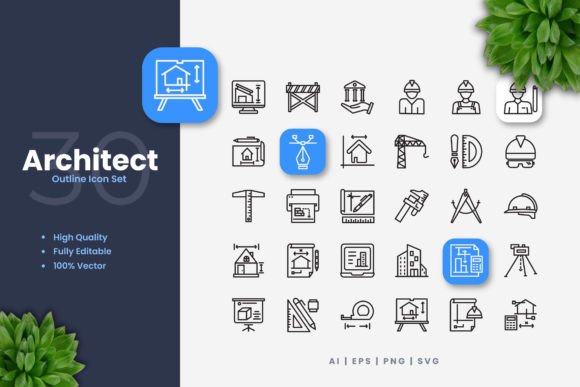
Architect Icons: The Foundation for Modern, Clean Design
In the fast-paced world of digital and print design, finding a reliable, high-quality set of icons can often be a significant hurdle. Whether you're designing a website interface, crafting a mobile app, or preparing a professional flyer, you need visual elements that communicate clearly, look sharp on any screen or paper, and integrate seamlessly into your workflow. This is where a dedicated icon set like Architect Icons becomes a fundamental tool in your creative arsenal.
The Challenge of Consistent, Professional Visual Communication
Designers, developers, marketers, and content creators frequently face a common set of challenges. Time is often limited, and budgets can be tight. You might need icons that are modern and minimalist to match a contemporary brand aesthetic, yet robust enough to be used across multiple platforms—from a tiny social media avatar to a large-scale conference banner. The struggle often lies in sourcing icons that are truly versatile: ones that don't pixelate when enlarged, don't look clunky when reduced, and maintain their professional appeal whether printed or viewed on a high-resolution display.
Furthermore, the need for customization is paramount. A client's brand color is a specific shade of blue, the stroke weight needs to match the typography of the website, or an icon needs a slight tweak to fit a unique concept. Using static, low-resolution PNGs locks you into a fixed design, forcing compromises in your project. The goal is always to achieve a cohesive, polished final product without being constrained by your graphical assets.
How Architect Icons Provides a Solution
Architect Icons is a comprehensive icon set designed specifically to address these practical needs. At its core, it is a collection of simple, clean icon designs that serve as a universal visual language. The "architect" theme speaks to its foundational role; these icons are built to be the reliable structural elements of your design project, providing clarity and elegance without unnecessary decorative complexity.
The true power of Architect Icons lies in its format. Being provided as 100% vector files means every icon is built from mathematical paths, not pixels. This gives you infinite scalability. You can resize an icon to any dimension—from a favicon to a billboard—without any loss of quality. The edges remain crisp, the lines stay smooth. This vector foundation directly solves the problem of inconsistent quality across different media outputs.
Empowering Customization and Integration
Perhaps the most significant advantage is the effortless customization. You are not just buying static images; you are acquiring editable source files. Using standard vector software like Adobe Illustrator or CorelDRAW, you can change colors instantly to match any palette, adjust stroke weights to align with your design’s tone, or even modify the shapes themselves if needed. The editable stroke feature is particularly valuable for fine-tuning the icon’s visual weight to ensure perfect harmony with your layout.
The included file formats are chosen for maximum practical utility. The source AI file works seamlessly within the Adobe ecosystem. The EPS Version 10 ensures compatibility with a wide range of legacy and modern software. The SVG file is ideal for modern web development, allowing for easy integration into code and animation. For situations where a raster format is required, ready-to-use PNG files with transparency are provided, saving you time from manually exporting. This multi-format approach ensures that whether your workflow is print-focused, web-based, or app-driven, Architect Icons fits right in.
Practical Applications and Outcomes
By using a versatile set like Architect Icons, you streamline your process and elevate your outcomes. Consider a web designer building a SaaS platform. They can use the SVG icons directly in the code, ensuring fast loading and sharp rendering on all browsers, while easily changing the icon color via CSS to reflect a user’s theme preference. The outcome is a more dynamic, professional-looking interface.
A marketing professional creating a campaign needs consistency across a brochure, social media posts, and a presentation. They can open the EPS files in their preferred software, apply the company’s exact brand colors, and generate assets for all channels from one source. The outcome is a cohesive brand identity that strengthens recognition.
An author or educator creating an infographic for a book or online course needs clear, explanatory imagery. They can drag and drop the PNGs into their layout tool for quick placement or use the vector files to create custom icon combinations. The outcome is an engaging, easy-to-understand visual resource that enhances communication.
Recommendations for Different Users
The way you approach Architect Icons will depend on your primary role and tools.
For Graphic Designers & Illustrators: Dive straight into the AI or EPS source files. Use them as a starting point for more complex compositions. You can ungroup elements, combine icons, or integrate them into larger illustrations, all while maintaining vector editability for future changes.
For Web & App Developers: Leverage the SVG files primarily. Their scalability and styleability via code make them perfect for responsive design. You can also use the PNGs for fixed-size elements if needed. The "easy drag and drop" nature means quick prototyping.
For Marketing & Content Teams: The PNG files with transparency might be your go-to for speed in social media or document creation. When a higher-fidelity print project arises, switch to the vector files to ensure premium quality for banners or posters.
Key Considerations for Implementation
To get the most from Architect Icons, remember a few useful points. First, always keep the original vector source files archived. They are your master copy for all future edits and resizing. Second, when editing strokes or colors in vector software, make changes globally where possible to maintain consistency across the set. Finally, while the icons are designed to be clean and simple, their effectiveness comes from your thoughtful application—use them to support and clarify your content, not overwhelm it.
It’s important to note that while the set provides a versatile mockup foundation, specific preview mockups are not included. This focuses the product purely on the functional, editable icons themselves, allowing you to place them into your own unique mockups and live projects.
A Foundation for Better Design Projects
In essence, Architect Icons is more than just a collection of graphics. It is a practical solution for achieving professional, consistent, and adaptable visual communication across the vast landscape of modern media. By providing high-quality, fully customizable vector icons in the most useful file formats, it removes common design obstacles and empowers you to focus on the bigger creative picture. Whether your next project is a website, an app, a book, or a flyer, starting with a solid foundation of clean, editable icons sets the stage for a successful and polished final design.